Tropical Hurricane Tracker
- 4.9
- Rating
- 500.00K
- Installs
- Free
- Price

 Analysis by App-foxy
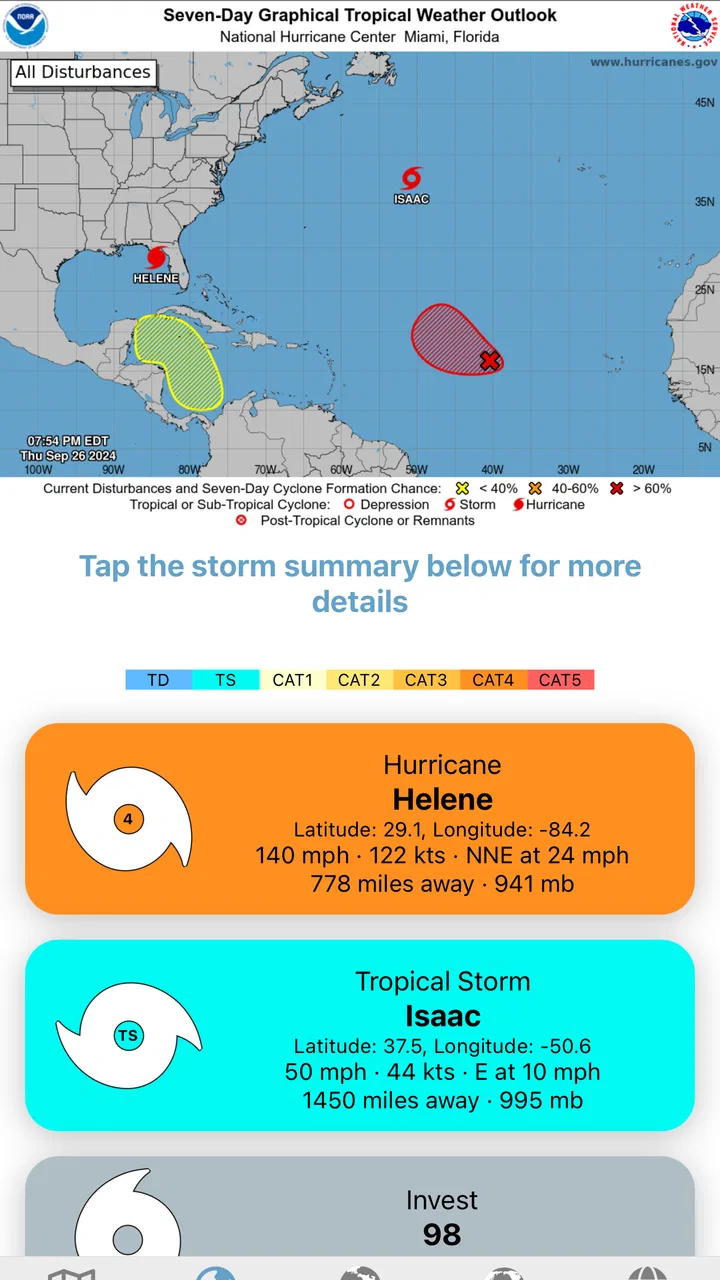
When a tropical system starts appearing in the news, I do not want a general weather app that buries the important details under hourly temperatures and local forecasts. I want a focused view of what is happening in the Atlantic, Pacific, or another monitored basin, and I want to check it quickly without turning the process into a research project. That is where Tropical Hurricane Tracker makes sense. It is a free weather app from JPL Technical Solutions built around current tropical cyclone activity, rather than everyday weather in my neighborhood.
After spending time with it, I see the app as a specialist tool rather than a replacement for every weather service on a phone. Its strongest quality is focus. The interface and purpose are centered on storms, so it is easier to follow a developing disturbance, compare the latest information with what I saw earlier, and keep a simple routine during an active weather period. The trade-off is just as important: people looking mainly for rain timing, pollen, radar, or a detailed local forecast may find a conventional weather app more useful.
How I use Tropical Hurricane Tracker in a normal storm-checking routine
My baseline workflow is deliberately simple. I open the app when I hear about a tropical disturbance or named storm, look at the current activity, and then check the information again later instead of trying to predict the situation from one glance. That habit matters because tropical systems change, and a single screen should not become a substitute for official emergency guidance.
You May Also Like

 Blood Strike: 2.5 Anniversary
Blood Strike’s Loadouts Turn Every Drop Into a Tactical Gamble
A close look at Blood Strike’s custom loadouts: how fast access to signature weapons reshapes its battle royale rhythm, rewards preparation, and narrows the gap between fights.

 Pandora - Music & Podcasts
Pandora’s Music Is Easy to Start, but Harder to Recover
Pandora’s strength is its low-effort path from a seed to a station. Its weak spot is how much confidence it asks you to place in connection, setup, and quiet recovery.

 8 Ball Pool
 Is Built on Rivalries, Rematches, and Routine
A close look at the rivalries, rematches, shared routines, and unanswered safety questions that turn a quick pool match into a persistent mobile community.

 Samsung Music
’s Quiet Strength Is Playing What You Already Own
Its reach comes less from spectacle than from dependable access to a personal library. That simplicity is both the app’s strongest retention engine and its ceiling.

 AccuWeather: Weather Radar
AccuWeather Review: A Quick, Clear Forecast for Everyday Decisions
For everyday plans, the best forecast is the one you can understand quickly. AccuWeather makes rain timing, radar, and local conditions easy to act on, with a few trade-offs.

 Hill Climb Racing
Why Hill Climb Racing Still Turns Crashes Into One More Run
A tiny car, a bumpy hill and one more upgrade: Hill Climb Racing keeps resurfacing because its simple chaos makes every near-miss feel personal.
More From Our News Desk



The app’s store summary describes up-to-date information about tropical cyclone activity, and that focus is apparent in the way I approach it. Rather than starting with my street address, I start with the broader storm picture. This is useful when I am traveling, checking on family in another coastal area, or following a system that has not yet affected my local forecast.
For example, imagine that I am planning a weekend near the coast and a tropical disturbance is being discussed. I would use this app first to understand whether there is a system worth watching, then move to a local weather service for exact rainfall timing, wind conditions, road information, and public alerts. That two-step workflow is more reliable than expecting one app to answer every question.
I also like that the app is free to install. That lowers the barrier for occasional users who only need a dedicated tracker during hurricane season or while preparing for travel. It is available for people using Android versions from 7.1 onward, which makes it accessible on many older devices as well as newer phones.
The audience response is encouraging without being the only reason I would recommend it. It holds an average rating of 4.9 from around 12 thousand ratings, with roughly 1.3 thousand written reviews. It has also passed half a million installs. Those figures suggest that the focused approach works for a substantial group of users, although my decision would still depend on whether I need storm tracking specifically or a full daily forecast package.
What I check before trusting a storm update
I try not to read a tropical tracker as if it were a precise appointment calendar. The useful question is not “Will the storm be exactly here at this exact time?” but “What is the current situation, and what should I verify next?” I compare the app’s information with official advisories when a system could affect people or property.
That distinction is one of the app’s most important practical lessons. A tracker can help me notice a developing pattern and keep the information organized in my mind, but it should not replace evacuation instructions, emergency alerts, local authorities, or official forecasts. For casual awareness, it is convenient. For decisions involving safety, I use it as one part of a wider information routine.
I also avoid checking it only once. A better habit is to make a first check when I hear about a system, a second check before making travel plans, and another check when official guidance changes. This repeatable approach is more valuable than staring at the screen continuously, especially when the app is being used to support planning rather than create anxiety.
Settings and habits worth checking before the busy season
The first setting-related step I recommend is making sure the app is comfortable to open and read on your phone. A tropical tracker is most useful when it can be checked quickly, so I keep it easy to find and avoid burying it in a folder with unrelated apps. This sounds basic, but it makes a difference when I am comparing several sources during a developing weather event.
I also check whether the current version behaves properly on my device. The listed current version is 4.3.20, and the app has been available since July 27, 2020. That history gives it a more established feel than a brand-new tracker, while the version number is a useful reminder to keep the installation current through the normal app store process.
Because the app is rated for Everyone, I would be comfortable recommending it as a straightforward information tool for a household. That does not mean every screen will be equally easy for every person, so I would still show a family member where to look before a storm becomes urgent. A few minutes of preparation is better than trying to explain the interface while everyone is already under pressure.
One detail I pay attention to is the distinction between the free experience and optional purchases. The app is free, but in-app purchases range from $1.99 to $6.99 per item. I do not treat that as an automatic negative, but I would review what an optional purchase provides before paying. If I only follow occasional storms, the free access may be enough; if I use the tracker frequently, I would decide whether an extra feature genuinely saves time rather than buying out of habit.
That is also where I would set a personal boundary. I would not pay simply because a storm is worrying me. I would first use the free version, compare it with the official information I already rely on, and then decide whether the paid option offers a practical improvement for my own routine. The price range is clear, but the value depends on how often I need the app and what I expect it to do.
A useful preparation routine
Before hurricane season becomes active, I would open the app once, look around, and decide what information I actually need from it. I would also make sure my phone has enough battery, that important emergency contacts are easy to reach, and that I know which official local channels provide warnings. The tracker can support that preparation, but it cannot replace the rest of it.
For travel, I would save the app as a dedicated storm-checking tool rather than treating it as my only weather source. I might check tropical activity in the morning, then use a local forecast for the destination and transportation details. This separation keeps the app’s role clear: it tells me about the wider tropical situation, while another service handles the immediate conditions around my route.
For family communication, I find a short shared routine more useful than forwarding every update. I can check the app, summarize what has changed in plain language, and then point relatives toward official instructions. That reduces the chance that someone mistakes a tracker screen for a direct warning intended for their exact location.
Faster ways to get value without overchecking
Experienced use is less about finding a secret feature and more about repeating a sensible sequence. I start with the app’s current storm picture, note whether the situation has changed since my last visit, and then decide whether I need a local source. This prevents me from spending time rereading the same information when nothing important has changed.
Another useful pattern is to separate awareness from action. During the awareness stage, I use the app to follow tropical cyclone activity and understand the general situation. During the action stage, I switch to official alerts, local authorities, transport providers, or emergency services. Keeping those jobs separate makes the tracker faster to use and reduces the temptation to make a major decision from a single source.
I would also avoid judging the app by how well it handles ordinary weather. Its purpose is not to be my complete daily forecast dashboard. If I open it expecting detailed neighborhood rain timing or a full week of lifestyle planning, I am using the wrong tool. If I open it because I want a focused storm reference, the narrow scope becomes an advantage.
A practical shortcut is to check it at consistent moments rather than whenever I feel nervous. For a trip, that could mean checking after the morning forecast and again before leaving. For a family member near the coast, it could mean checking when official advisories are updated. The exact schedule should follow the situation, but the principle is the same: use a repeatable habit instead of constant refreshing.
I also find it helpful to write down the question before opening the app. Am I checking whether there is an active system? Am I following a storm I already know about? Am I deciding whether to investigate local conditions elsewhere? A clear question makes a focused app feel faster because I am not wandering through it looking for an undefined answer.
Where it fits beside ordinary weather apps
Most general weather apps are better for the details of daily life. They usually make it easier to check the temperature near home, hourly rain chances, short-term conditions, or a forecast tied to a precise location. If those are my main needs, I would keep using a conventional weather service and would not install a specialist tracker just for routine mornings.
Tropical Hurricane Tracker is more appealing when the question is broader and more seasonal. It gives me a dedicated place to look when tropical cyclone activity is the subject, without forcing me to search through unrelated forecast cards. That focus is especially useful for coastal residents, travelers, boat owners, relatives monitoring another region, and anyone who wants a storm-specific reference during an active period.
It is not necessarily an either-or decision. I would pair it with a general weather app, official alerts, and local emergency information. The specialist app helps me maintain awareness; the other tools help me understand what that awareness means for a particular place. In my view, that combination is stronger than asking Tropical Hurricane Tracker to become a complete weather platform.
Advanced limits I would keep in mind
The biggest limitation is the risk of false confidence. A clean storm-tracking view can feel authoritative, but tropical forecasting involves uncertainty and changing conditions. I would never use this app alone to decide whether to evacuate, cancel a safety plan, or ignore a warning. Those decisions belong with official instructions and local expertise.
The second limitation is scope. The app is about tropical cyclone activity, so it may not satisfy someone who wants an all-purpose weather companion. If I need severe thunderstorm alerts, road conditions, radar interpretation, air quality, or a detailed local forecast, I would look for those functions elsewhere rather than assume this app covers them.
The optional purchase model is another point to consider. Free access is helpful, but the presence of purchases means I should understand where the free experience ends before recommending it to someone who expects every capability without extra cost. I would test the basic workflow first and only consider spending if the added value is obvious in my own use.
Compatibility is reasonably broad because the minimum operating system is Android 7.1, but anyone using an older device should check that requirement before planning around the app. On a supported phone, I would still keep a second way to access official information, especially before travel or during a serious storm. No single app should be the only communication channel in an emergency.
There is also a human limitation: frequent checking can become stressful without improving decisions. I prefer to use the app at sensible intervals, record what has changed, and then act on verified local guidance. That workflow turns it into a planning aid instead of a source of endless speculation.
Who should install it, and who should skip it
I would recommend it to someone who wants a dedicated tropical storm reference, follows seasonal activity, or needs to monitor systems affecting a different region. It is also a good fit for people who dislike digging through a general weather app to find storm information. The free starting point makes it easy to try without committing money immediately.
I would be less enthusiastic for a person who only wants tomorrow’s forecast, a rain notification for a commute, or a detailed picture of conditions at one address. That user will probably get more value from a standard local weather app. I would also hesitate to recommend it as the sole tool for emergency decisions, regardless of how high its average rating is.
For families, I think it works best when one person uses it as part of a broader communication plan. The app can help everyone start from the same storm picture, but the household should still know where official warnings come from and what actions local authorities recommend.
My verdict after building a repeatable workflow
What I appreciate most about Tropical Hurricane Tracker is that it understands the value of a narrow purpose. I can open it with a specific question, follow tropical cyclone activity without sorting through unrelated weather information, and then move to a local or official source when the decision becomes more serious. That makes it useful in a way a generic forecast app is not always useful.
My recommendation comes with clear conditions. Use it as a focused awareness tool, not as a replacement for emergency communication. Combine it with a local forecast when planning travel, and with official authorities when safety is involved. Check the free experience before considering the optional purchases, and do not let repeated refreshing take the place of a sensible plan.
JPL Technical Solutions has produced an app that suits a specific but important need. Its established release history, current version 4.3.20, Everyone age rating, and broad availability on supported Android devices make it approachable. The strong user response reinforces that impression, but the real reason I would suggest trying it is simpler: when tropical activity is the thing I need to follow, a dedicated tracker is more efficient than forcing a general weather app to do the same job.
If your weather needs are mostly local and everyday, skip it and stay with the service you already trust. If you want a focused companion for monitoring tropical systems, especially alongside official information and a normal forecast app, I think this free download is worth trying. Its best feature is the disciplined workflow it encourages: check the storm picture, verify the local impact, and make decisions from the right source.
FAQs for Tropical Hurricane Tracker
01What features does the Tropical Hurricane Tracker offer?
The Tropical Hurricane Tracker provides real-time updates on developing storms, detailed maps showing storm paths, and push notifications for severe weather alerts. Users can access historical data, track multiple storms simultaneously, and receive expert analysis. The app also includes an interactive radar to monitor weather patterns closely.
02How accurate are the storm predictions in the app?
The Tropical Hurricane Tracker uses data from reliable meteorological organizations and employs advanced algorithms to predict storm paths and intensities. While no app can guarantee 100% accuracy due to the unpredictable nature of weather, it continuously updates and refines its predictions as new data becomes available.
03Is the Tropical Hurricane Tracker app free to use?
The app offers a free version with basic features, including storm tracking and alerts. However, for more detailed insights and advanced features such as historical data and expert analysis, a premium subscription is available. The free version is sufficient for most casual users, while the premium version caters to weather enthusiasts and professionals.
04Can I customize the notifications and alerts?
Yes, the app allows users to customize notifications to suit their preferences. You can choose to receive alerts for specific storm categories, set your preferred notification sound, and select the frequency of updates. This ensures you stay informed about relevant weather events without receiving unnecessary alerts.
05Does the app require an internet connection to function?
An active internet connection is necessary for the app to provide real-time updates and accurate data. However, it does cache some information for offline viewing, ensuring you can access recent updates even when temporarily offline. For the best experience, a stable internet connection is recommended.
Pros
- Accurate real-time storm updates.
- User-friendly interface with clear visuals.
- Customizable alerts for specific locations.
- Detailed storm history and forecasts.
- No intrusive ads for distraction-free use.
Cons
- Limited offline functionality.
- Some features require in-app purchases.
- Occasional slow loading times.
- Limited language options available.
- Requires stable internet connection.

Tropical Hurricane Tracker
Gallery